Building a Production-Grade SQL Agent with LangGraph, PostgreSQL, and Query Guardrails 🛡️
Building a production-grade SQL agent with LangGraph, PostgreSQL, and AST query guardrails.
Giving an LLM direct access to your database feels like magic in a weekend demo. A business user types: “Show me the top 5 customers by revenue in NewYork this quarter,” the model generates clean SQL, runs it, and shows the answer. Everyone in the room is impressed.
Then you try to take it to production.
And that’s where things get interesting — not in a good way.
What happens when an engineer accidentally types: “Clear out dummy users from yesterday”? Or when a user asks a complex aggregation that joins 12 unindexed tables with no LIMIT, effectively locking your live database and spiking CPU to 100%?
If you’re passing raw text to SQL and running it directly — no checks, no guardrails — you’re one bad prompt away from a disaster. I’ve seen this happen. It’s not pretty.
Building a SQL Agent that’s actually ready for production is not just about writing good prompts. It’s about state management, tool safety, query validation at the AST level, and human-in-the-loop checkpoints where it matters.
Let’s build this properly using LangChain, LangGraph, and PostgreSQL/MySQL.
The Architecture: Why a Simple Chain Isn’t Enough
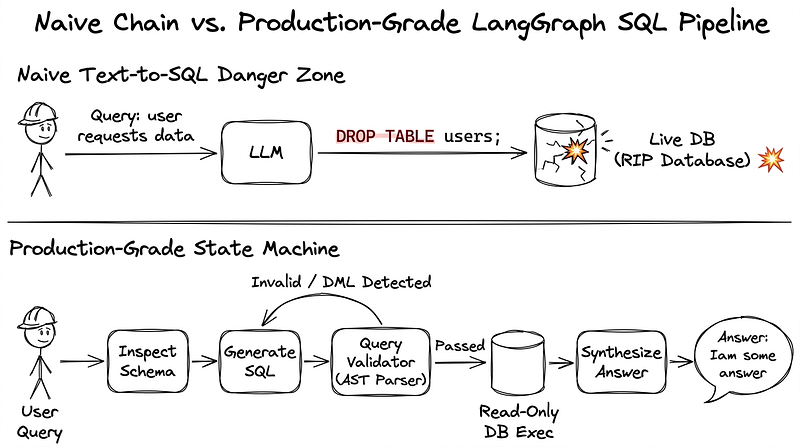
A naive SQL agent is just a straight line: Query → Prompt → SQL → DB → Output. If anything breaks — wrong table name, bad syntax, a hallucinated column — the whole thing crashes.
To make this reliable, we build an agentic state machine using LangGraph. Think of it as a flowchart with real safety checks built in before any query reaches your database.
The top half shows the fragile naive pipeline — user input goes straight to the LLM and directly executes on your live database, ending in a shattered production database. The bottom half shows the resilient LangGraph pipeline with schema inspection, proper AST query validation, and an automated self-correction loop.
Step 1: The Three Ground Rules Before You Write Any Code
Before even opening your IDE, set these three rules in stone:
1. Least Privilege Database Role The agent should log in using a dedicated DB user that has only SELECT permissions. No INSERT, UPDATE, DELETE, DROP, or ALTER. Period. If your agent doesn’t need to write, don’t give it write access. Simple.
2. Statement Timeouts In PostgreSQL, you can add SET statement_timeout = '5000ms'; at the session level. This kills any query that takes more than 5 seconds. Without this, one poorly written JOIN can hold your connection pool hostage and bring down your application.
3. AST Validation — Don’t Trust LLM SQL Blindly System prompts like “Only generate SELECT queries” work… until they don’t. LLMs will eventually break that rule, especially on complex inputs. The right approach is to parse the generated SQL using an AST (Abstract Syntax Tree) parser and programmatically verify it before running anything. We’ll use sqlglot for this.
Step 2: Validating Queries with sqlglot
Here’s a standalone validator function that catches dangerous queries before they reach your database:
import sqlglot
from sqlglot import exp

FORBIDDEN_EXPRESSIONS = (
    exp.Insert,
    exp.Update,
    exp.Delete,
    exp.Drop,
    exp.Alter,
    exp.TruncateTable,
    exp.Command, # Blocks raw commands like COPY
)

FORBIDDEN_SCHEMAS = ("information_schema", "pg_catalog")
FORBIDDEN_TABLES = ("pg_shadow", "pg_authid", "pg_user")

def validate_sql_query(query: str, max_limit: int = 100) -> str:
    """
    Parses and sanitizes SQL for production safety.
    """
    query = query.strip()
    if not query:
        raise ValueError("SQL query cannot be empty.")

    # 1. Parse ALL statements (do not use parse_one!)
    try:
        statements = sqlglot.parse(query, read="postgres")
    except Exception as e:
        raise ValueError(f"SQL Syntax Error: {e}")

    # 2. Prevent multi-statement injection chains
    if len(statements) != 1:
        raise ValueError("Multi-statement queries are strictly prohibited.")

    parsed = statements[0]

    # 3. Whitelist approach: Only SELECT is allowed
    if not isinstance(parsed, exp.Select):
        raise PermissionError("Security violation: only SELECT queries are allowed.")

    # 4. Blacklist fallback for nested destructive operations
    if parsed.find(*FORBIDDEN_EXPRESSIONS):
        raise PermissionError("Security violation: DDL/DML statements are blocked.")

    # 5. Block system table snooping
    for table in parsed.find_all(exp.Table):
        if table.name.lower() in FORBIDDEN_TABLES:
            raise PermissionError("Security violation: Access to system tables is restricted.")
        if table.db and table.db.lower() in FORBIDDEN_SCHEMAS:
            raise PermissionError("Security violation: Access to system schemas is restricted.")

    # 6. Enforce safe result pagination to prevent memory exhaustion
    if not parsed.find(exp.Limit):
        parsed = parsed.limit(max_limit)

    return parsed.sql(dialect="postgres")
This is small, readable, and does three important things: blocks SQL injection chains, blocks write operations, and adds a safety LIMIT if the LLM forgot to include one.
A raw SQL string from the LLM enters the AST parser. Two separate checks run — one for dangerous operations, another for missing pagination. The output is a safe, paginated query.
Step 3: Wiring Everything Together with LangGraph
Now let’s build the actual state machine. The key design decision here: if the query fails validation or hits a DB error, we don’t just crash. We capture the error, send it back to the SQL generator, and let the model try again — up to 3 times.
import os
from typing import TypedDict, Optional
from dotenv import load_dotenv
from langgraph.graph import StateGraph, END
from langchain_openai import ChatOpenAI
from langchain_community.utilities import SQLDatabase

load_dotenv()

# Initialize DB with connection-level safeguards (5-second timeout)
db = SQLDatabase.from_uri(
    os.getenv("READONLY_DB_URI"),
    engine_args={"connect_args": {"options": "-c statement_timeout=5000"}}
)

llm = ChatOpenAI(model="gpt-4o", temperature=0)

class AgentState(TypedDict):
    question: str
    schema: str
    generated_sql: Optional[str]
    query_result: Optional[str]
    error: Optional[str]
    attempts: int

def generate_sql_node(state: AgentState) -> dict:
    prompt = f"""
    Given the schema:
    {state['schema']}

    Convert this question into a PostgreSQL query:
    {state['question']}

    Previous Error: {state.get('error', 'None')}
    Return ONLY valid SQL. Do not wrap in backticks.
    """
    response = llm.invoke(prompt)
    return {
        "generated_sql": response.content.strip(),
        "attempts": state.get("attempts", 0) + 1
    }

def execute_sql_node(state: AgentState) -> dict:
    raw_query = state["generated_sql"]
    try:
        # Pass through the strict AST gatekeeper
        safe_query = validate_sql_query(raw_query)
        result = db.run(safe_query)
        return {"query_result": str(result), "error": None}
    except Exception as err:
        return {"error": str(err), "query_result": None}

def validation_router(state: AgentState) -> str:
    if state["error"]:
        if state["attempts"] >= 3:
            return "synthesize_node"  # Graceful exit after 3 failed attempts
        return "generate_sql_node"    # Trigger LLM self-correction loop!
    return "synthesize_node"

def synthesize_node(state: AgentState) -> dict:
    if state.get("error"):
        ans = f"Sorry, I couldn't run this query safely. Error: {state['error']}"
    else:
        prompt = f"Question: {state['question']}\nResult: {state['query_result']}\nProvide a concise answer:"
        ans = llm.invoke(prompt).content
    return {"query_result": ans}

# Build the Graph
workflow = StateGraph(AgentState)
workflow.add_node("generate_sql_node", generate_sql_node)
workflow.add_node("execute_sql_node", execute_sql_node)
workflow.add_node("synthesize_node", synthesize_node)

workflow.set_entry_point("generate_sql_node")
workflow.add_edge("generate_sql_node", "execute_sql_node")
workflow.add_conditional_edges(
    "execute_sql_node",
    validation_router,
    {
        "generate_sql_node": "generate_sql_node",
        "synthesize_node": "synthesize_node"
    }
)
workflow.add_edge("synthesize_node", END)

sql_agent = workflow.compile()
Step 4: Adding Human-in-the-Loop for Sensitive Tables
Some databases have tables you really don’t want a model touching automatically — think salary, pan_number, or credit_limit. For these, LangGraph lets you add a breakpoint that pauses execution and waits for a human supervisor to approve before proceeding.
When a query targets sensitive columns or tables, it triggers an execution pause. An admin inspects the actual SQL string generated by the LLM on a dashboard, hits approve, and LangGraph resumes safely from its state checkpoint.
This is especially crucial in finance and HR systems where data access isn’t just a technical concern — it’s a compliance necessity.
Things to Keep in Mind for Production
A few things I’d strongly recommend once you’re past the prototype stage:
- Don’t dump your entire database schema into the prompt. If your DB has 200 tables and you send all of them to the LLM, you’re burning tokens and confusing the model. Use vector search or simple routing to pass only the 4–5 tables relevant to the question.
- Keep credentials out of the model service. The SQL generation service and the SQL execution service should be separate. Your model should never directly hold a database connection string. Separate the two with network policies.
- Treat natural language input like untrusted user input from a web form. This mindset shift is important. It means: restrict the DB user’s permissions, always validate query ASTs, and let LangGraph manage self-correction so your users get graceful error messages instead of stack traces.
If you found this article helpful, do leave a clap 👏 and follow for more insights on GenAI, Python, and backend engineering!
Discussion
Have a question, a correction, or a different approach? Sign in with GitHub to join the conversation.