Beyond Basic RAG: Supercharge Retrieval Quality with Hybrid Search, pgvector, BM25, and Reranking…
Supercharge retrieval quality with hybrid search using pgvector, BM25, and reranking.
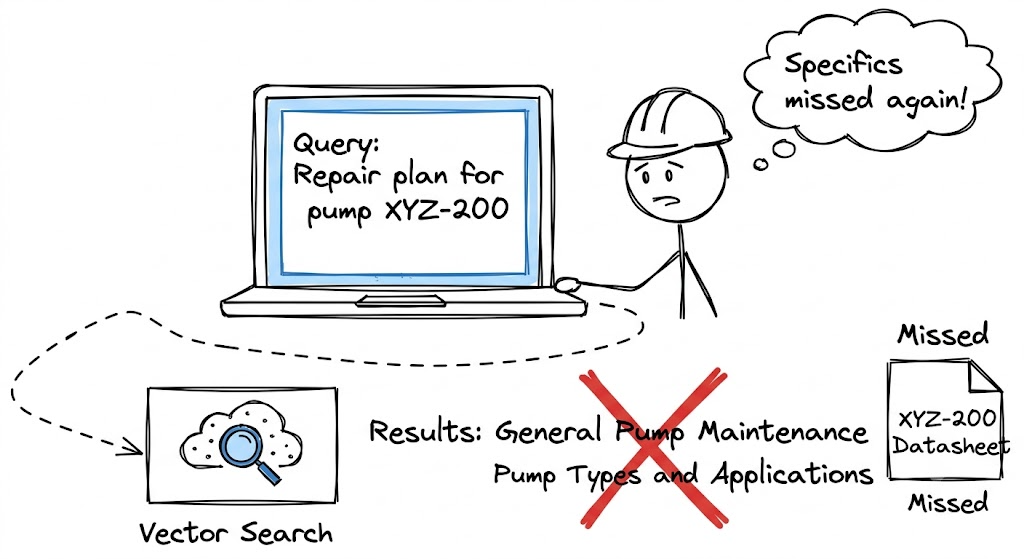
If you have spent any time in the Generative AI space recently, you already know about RAG (Retrieval-Augmented Generation). It’s the go-to solution for making LLMs chat with your private data.
But, let me tell you, the real challenge starts when you move from a sweet little POC (Proof of Concept) to actual production.
A few months back, I was building a standard RAG pipeline using a basic vector search. It worked like a charm during the initial demos. But the moment we pushed it closer to production and real users started firing real-world queries, the feedback was brutal:
“It’s giving me general information about pumps, but I asked specifically about the maintenance schedule for the ‘XYZ-200’ model!”
And:
“It keeps missing the crucial troubleshooting steps mentioned in the manual, even when I search for the exact error code E-404!”
This is the classic failure mode of pure vector-based retrieval. I was scratching my head, wondering how to fix this retrieval quality issue without overcomplicating the backend architecture. That’s when I was introduced to the holy trinity of advanced RAG: Hybrid Retrieval (Vector + Keyword) + Reranking.
In this article, let’s dive into how we can club these technologies together using LangChain, PostgreSQL (pgvector), BM25, and a Reranker to build a robust, production-ready RAG system.
The Problem: Why Vector Search Isn’t Enough 🤷♂️
Let’s get one thing straight — Vector embeddings are pure magic. When you search for “automobile”, a vector database knows you are also talking about “cars” and “vehicles” because it maps semantic meaning into a high-dimensional space.
However, vector search works by mapping semantic meaning. It struggles with exact keyword matching. When your user searches for a specific ID like TX-99402, or an obscure error code like E-404, a pure vector search might bring up documents containing TX-99401 or general troubleshooting advice just because they are semantically “close.” It is just too smart to notice the exact sequence of letters and numbers.
Enter Hybrid Retrieval: The Jugaad We All Need 🤝
To fix our retrieval quality, we need a classic engineering jugaad. We need the best of both worlds by running two different search methods in parallel:
- Dense Retrieval (Vector Search): To capture the context and semantics. For this, instead of spinning up a costly, dedicated vector database, I highly recommend using PostgreSQL with the
pgvectorextension. Most enterprise applications are already running on Postgres. Adding a vector column keeps your data stack clean and your DevOps team very happy. - Sparse Retrieval (Keyword Search): To capture exact matches, acronyms, and specific domain jargon. The go-to algorithm here is the old-school but highly effective BM25.
Think of it this way: Vector search finds the right neighborhood, while BM25 finds the exact house number. We combine the top results from both methods.
The Secret Sauce: The Reranker 🌶️
Implementing hybrid search is a massive upgrade, but we immediately hit a roadblock.
When you combine the results from pgvector and BM25, you now have two different sets of documents. We can’t just blindly mix them because BM25 scores (based on word frequency) and Vector similarity scores (cosine distance) are on completely different mathematical scales. A semantic score of 0.82 is not necessarily “better” than a BM25 score of 14.5. You cannot just merge and sort them blindly.
This is where the Reranker comes into the picture. A reranker is a specialized machine learning model (often a Cross-Encoder). Instead of just looking at abstract embeddings, a reranker takes the user’s query and the retrieved document together and scores how relevant they are to each other.
Instead of deciding which set is better, we take the top 10 candidates from pgvector and the top 10 from BM25, pool all 20 together, and pass them through the Reranker. This model reads the actual text and acts like a strict editor, meticulously re-ordering the documents from most relevant to least relevant. We pick the top 3 results from this refined list and those are what we feed to the LLM.
A quick note for my fellow backend engineers: Cross-encoders are computationally heavy. Running 20 documents through a reranker will add latency to your API response. If you are building a streaming chat API (like with FastAPI), you need to monitor this step closely. The trade-off in response time is almost always worth the massive bump in accuracy, but keep an eye on your latency tracking!
Conceptual Implementation Guide with LangChain
When building this out in Python, LangChain’s abstraction layers make wiring this micro-architecture up fairly straightforward.
1. Document Ingestion Phase
import pickle
from langchain_community.document_loaders import TextLoader
from langchain_text_splitters import RecursiveCharacterTextSplitter
from langchain_openai import OpenAIEmbeddings
from langchain_postgres.vectorstores import PGVector
from langchain_community.retrievers import BM25Retriever

CONNECTION_STRING = "postgresql+psycopg://user:password@localhost:5432/mydb"
COLLECTION_NAME = "hybrid_docs"

def ingest_documents(file_path: str):
    # 1. Load and chunk the document
    loader = TextLoader(file_path)
    docs = loader.load()

    text_splitter = RecursiveCharacterTextSplitter(chunk_size=1000, chunk_overlap=100)
    chunks = text_splitter.split_documents(docs)

    # 2. Store dense embeddings in pgvector
    embeddings = OpenAIEmbeddings(model="text-embedding-3-small")
    PGVector.from_documents(
        embedding=embeddings,
        documents=chunks,
        collection_name=COLLECTION_NAME,
        connection=CONNECTION_STRING,
    )

    # 3. Fit and save the BM25 sparse retriever
    bm25_retriever = BM25Retriever.from_documents(chunks)
    with open("bm25_retriever.pkl", "wb") as f:
        pickle.dump(bm25_retriever, f)

    print(f"Successfully ingested {len(chunks)} chunks.")

# Example usage:
# ingest_documents("technical_manual.txt")
2. Hybrid Retrieval Phase
import pickle
from langchain_openai import OpenAIEmbeddings
from langchain_postgres.vectorstores import PGVector
from langchain.retrievers import EnsembleRetriever, ContextualCompressionRetriever
from langchain_cohere import CohereRerank

CONNECTION_STRING = "postgresql+psycopg://user:password@localhost:5432/mydb"
COLLECTION_NAME = "hybrid_docs"

def setup_hybrid_retriever():
    # 1. Initialize Vector Retriever
    embeddings = OpenAIEmbeddings(model="text-embedding-3-small")
    vectorstore = PGVector(
        connection=CONNECTION_STRING,
        embeddings=embeddings,
        collection_name=COLLECTION_NAME,
    )
    # Fetch top 10 semantic matches
    pgvector_retriever = vectorstore.as_retriever(search_kwargs={"k": 10})

    # 2. Load Keyword Retriever (BM25)
    with open("bm25_retriever.pkl", "rb") as f:
        bm25_retriever = pickle.load(f)
    # Fetch top 10 exact keyword matches
    bm25_retriever.k = 10

    # 3. Merge pools with EnsembleRetriever (50/50 weighting)
    hybrid_retriever = EnsembleRetriever(
        retrievers=[bm25_retriever, pgvector_retriever],
        weights=[0.5, 0.5]
    )

    # 4. Rerank the combined 20 chunks to output the absolute top 3
    reranker = CohereRerank(cohere_api_key="YOUR_COHERE_API_KEY", top_n=3)
    advanced_retriever = ContextualCompressionRetriever(
        base_compressor=reranker,
        base_retriever=hybrid_retriever
    )

    return advanced_retriever

def query_system(query: str):
    retriever = setup_hybrid_retriever()
    best_docs = retriever.invoke(query)

    for i, doc in enumerate(best_docs):
        print(f"\n--- Result {i+1} ---")
        print(doc.page_content)

# Example usage:
# query_system("What is the warranty period for the TX-99402 sensor?")
Conclusion
Building a RAG application is easy, but making it production-ready requires a bit of engineering. By implementing this pipeline, you are practically guaranteeing that your LLM gets the most accurate, context-rich, and keyword-precise data possible.
You cannot afford to settle for “okay” retrieval when your users are asking specific questions. Invest the time to build a hybrid pipeline. Your users will thank you.
Have you tried implementing Hybrid search in your RAG pipelines? I would love to hear your experiences. Drop a comment below, and let’s discuss!
If you found this article helpful, do leave a clap 👏 and follow for more insights on GenAI, Python, and backend engineering!
Discussion
Have a question, a correction, or a different approach? Sign in with GitHub to join the conversation.