Temporal Internals: How Durable Execution, Replay and Workflow Recovery Actually Work
How durable execution, event history replay, transfer tasks, and workflow recovery work in Temporal.
Imagine a customer placing an order on your application.
Once the order is placed, several things need to happen:
- Charge the customer’s card.
- Reserve the inventory.
- Request shipment.
- Wait until the package is delivered.
- Send a review email.
At first glance, this looks like a fairly simple background process. We can write a function that calls these operations one after another.
def process_order(order):
  charge_customer(order)
  reserve_inventory(order)
  request_shipment(order)

  while not is_delivered(order):
    sleep(5 days)

  send_review_email(order)
The code is straightforward. But there is a problem.
What happens if our application crashes after charging the customer but before reserving the inventory?
What happens if the worker restarts after three days of waiting for the package? Will it start everything again? Will the customer get charged twice?
We can solve these problems by adding database tables, job queues, retry mechanisms and status checks. But as the number of steps increases, we slowly start building our own workflow engine.
This is the problem Temporal tries to solve.
Temporal is a workflow orchestration system built around a concept called Durable Execution. It allows a process to survive application crashes, worker restarts, retries and long waiting periods without losing its progress.
Let’s understand how it works, starting with a simple function and gradually moving into Temporal’s internal architecture.
1. Understanding Durable Execution through Replay
Most application code is designed around the assumption that the process executing it will remain alive until the work is completed.
That assumption is not always true.
A server can crash, a container can restart, a deployment can happen, or a worker can become unavailable. When that happens, the in-memory state of the application is lost.
Traditional background processing usually handles this by saving the current status in a database and allowing another worker to pick up the job later.
But this means we need to manage several things ourselves:
- Which steps have completed?
- Which steps are still pending?
- Should an operation be retried?
- What happens if a worker crashes between two operations?
- How do we resume a process that has been waiting for several days?
Temporal approaches this differently.
Instead of expecting the original application process to remain alive, Temporal records the progress of a Workflow in a durable Event History.
When a worker crashes, another worker can reconstruct the execution using that history.
Let’s understand this with a smaller example.
Suppose we have a Workflow that fetches a stock price and calculates a value based on it.
@activity.defn
async def fetch_stock_price(symbol: str) -> float:
    return 2500.0

@workflow.defn
class StockWorkflow:
    @workflow.run
    async def run(self, symbol: str) -> float:
        price = await workflow.execute_activity(
            fetch_stock_price,
            symbol,
            start_to_close_timeout=timedelta(seconds=10),
        )
        return price * 1.1
There are two important things happening here.
First, fetch_stock_price() performs an external operation. Temporal records the result returned by this Activity.
Second, price * 1.1 is ordinary Workflow logic. It is calculated as the Workflow executes.
Now imagine the worker crashes after the Activity has completed.
A new worker picks up the Workflow and starts executing the code again.
Does Temporal call fetch_stock_price() again?
No. Since the completed Activity result is already recorded in the Event History, Temporal reuses that result during replay.
The calculation price * 1.1 runs again using the previously recorded price.
This is the basic idea behind Replay.
Replay means running the Workflow code again and substituting previously recorded results whenever an operation has already completed. This allows Temporal to reconstruct the Workflow’s state without restoring the original worker’s memory.
What happens in our order example?
Suppose the execution went like this:
- Customer payment was successful.
- Inventory was reserved successfully.
- Worker crashed before requesting shipment.
Temporal has already recorded the results of the first two operations.
When a new worker picks up the Workflow, it replays the code. It encounters the payment operation and retrieves its recorded result. It then does the same for the inventory reservation.
Finally, it reaches the shipment operation, which has not completed yet, and executes it.
The new worker does not need to start the entire process from scratch.
This is how Temporal makes long-running processes recoverable.
2. Workflow vs Activity: Two important building blocks
Replay introduces an important design decision.
Not all code can be executed again safely.
For example, consider these operations:
- Charging a customer through Stripe.
- Updating an inventory database.
- Calling a shipping provider.
- Sending an email.
These operations interact with the outside world.
If Temporal executes them again during replay, we could charge the customer twice or send duplicate emails.
To avoid this problem, Temporal separates application logic into two categories.
Workflow
A Workflow contains the orchestration logic. It decides what needs to happen and in what order.
The Workflow code must be deterministic because Temporal may execute it again during replay.
Activity
An Activity performs work that interacts with external systems.
Activities can call APIs, access databases, send emails and perform other operations outside the Workflow.
Temporal records the results of completed Activities so that replay can reuse them.
Our order-processing flow can now be represented like this:
@workflow.defn
class OrderWorkflow:
@workflow.run
    async def run(self, order):
        await workflow.execute_activity(
            charge_customer,
            order,
        )
        await workflow.execute_activity(
            reserve_inventory,
            order,
        )
        await workflow.execute_activity(
            request_shipment,
            order,
        )
        # Wait for delivery
        await workflow.execute_activity(
            send_review_email,
            order,
        )
The actual implementation of payment, inventory and shipment operations lives inside separate Activities.
Idempotency: What happens when an Activity is retried?
There is still an important failure scenario we need to consider.
Suppose Temporal sends an Activity request to Stripe.
Stripe successfully charges the customer, but the worker crashes before Temporal receives confirmation of the Activity’s completion.
From Temporal’s perspective, the Activity might not have completed.
What happens next?
Temporal may retry the Activity.
This means the external payment request could be sent again.
This is why external operations need idempotency.
For example, instead of generating a new payment request every time, we can use a stable idempotency key:
Payment Activity
    |
    v
Stripe API
    |
    v
Idempotency Key: paymentId_123
Similarly, we can use separate keys for inventory reservation and shipment requests.
Idempotency-Key (client, per checkout attempt): K

reserveInventory   -> key = K + ":reserve"
createPayment      -> key = K + ":payment"
createShipment     -> key = K + ":dispatch"
The idea is that retrying the same logical operation should not create a second side effect.
Temporal provides retries, but it cannot guarantee that an external API will never receive the same request more than once. The external system must also support safe handling of duplicate requests, or we need to implement that protection ourselves.
What about undoing a completed operation?
Now consider another situation.
The payment was successful and inventory was reserved, but the shipment request failed permanently.
We may not want to leave the customer’s money charged and the inventory locked.
We need to reverse the completed business operations.
For example:
Normal execution:
Charge Customer
      |
      v
Reserve Inventory
      |
      v
Request Shipment

Compensation:
Release Inventory
      |
      v
Refund Payment
These reverse operations are known as compensating operations.
Temporal does not automatically roll back external side effects. It does not magically refund a payment or release inventory.
We need to implement those reverse operations as Activities and decide when they should run.
For example, if shipment creation fails, our Workflow can:
- Release the inventory reservation.
- Refund the payment.
- Mark the order as failed.
This is different from database rollback. Once an external system has completed an operation, we generally need another business operation to compensate for it.
3. Why Workflow code must be deterministic
Now that we understand Replay, there is another important requirement.
Replay only works when the Workflow follows the same execution path every time it is reconstructed from the same history.
In other words, Workflow code must be deterministic.
Consider this example:
def process_order(order):
charge_customer(order)
    reserve_inventory(order)
    if current_time() < "5:00 PM":
        request_same_day_pickup(order)
    else:
        request_next_day_pickup(order)
    wait_until_delivered(order)
    send_review_email(order)
Suppose a customer places an order at 4:59 PM.
The first execution checks the time and chooses same-day pickup.
Now imagine the worker crashes, and another worker replays this Workflow at 5:03 PM.
The same time check now returns a different result.
The original execution took the same-day pickup branch, but the replay takes the next-day pickup branch.
This breaks the deterministic execution model.
How does Temporal solve this?
Instead of reading the machine’s system clock directly, the Workflow should use Temporal’s Workflow Clock.
For example:
# Non-deterministic
start = datetime.now()

# Deterministic
start = workflow.now()
await workflow.sleep(50)
Temporal records the information needed to reconstruct the same logical time during replay.
So even when another worker executes the Workflow later, it gets the same logical time recorded for the original execution.
The general rule is simple:
Workflow code should make decisions using information that Temporal can consistently reproduce during replay.
Operations that depend on changing external state, such as database queries or external API calls, generally belong inside Activities.
4. How does Temporal handle long waiting periods?
Let’s return to our order example.
After requesting shipment, we need to wait for the package to be delivered.
One way to write this is:
sleep(5 days)But we cannot keep a worker process running for five days just to wait.
Imagine having thousands or millions of Workflows waiting for different durations. Keeping a process or thread occupied for every waiting Workflow would be wasteful.
Temporal solves this using Durable Timers.
Understanding Durable Timers
When a Workflow reaches:
await workflow.sleep(5 days)Temporal does not simply block a worker for five days.
Instead, it calculates the timer’s deadline and persists the timer information.
Conceptually, the history contains an event similar to:
TimerStarted {
    fireAt: May 15, 10:00 AM
}
A background timer processor monitors these durable timers.
It can process timers based on their deadlines without keeping a separate worker running for each waiting Workflow.
When the deadline arrives, Temporal records the timer firing:
TimerFiredThe Workflow is then scheduled to execute again.
During replay, Temporal encounters the sleep operation and checks the recorded history:
sleep(5 days)

TimerStarted already exists
TimerFired exists
Continue execution
If the timer has not fired yet, the Workflow simply waits again.
A Workflow can wait for five days, five months or even longer without consuming a worker process for the entire duration.
The History Service stores a Timer Task with its deadline. A background timer processor reads these tasks and processes them when they become due.
The processor serves many Workflows. Each sleeping Workflow does not need its own process.
If the History Service instance crashes, another instance can take ownership of the relevant History Shard and recover pending timers from durable storage.
An outage may delay a timer from firing, but it does not erase the timer.
5. What if we don’t know how long we need to wait?
A five-day timer works when we know exactly how long we need to wait.
But real-world processes are not always predictable.
In our order example, the package might arrive tomorrow, or it might take a week.
What we actually want is not to wait for five days. We want to wait until the shipping carrier tells us that the package has been delivered.
This is where Temporal Signals come into the picture.
Understanding Signals
Imagine the Workflow reaches:
wait_until_delivered(order)At this point, the Workflow has nothing else to do. It can stop executing and wait for an external event.
Three days later, the shipping carrier sends a webhook informing us that the package has been delivered.
Our webhook handler receives this notification and sends a Signal to the corresponding Temporal Workflow.
Temporal records the Signal in the Workflow’s Event History and schedules the Workflow to run again.
The replay now encounters the delivery event:
ChargeCustomerCompleted
ReserveInventoryCompleted
RequestShipmentCompleted
PackageDelivered
The Workflow reaches the waiting condition:
waitUntilDelivered(order)

PackageDelivered exists
Continue
It then proceeds with the next Activity:
sendReviewEmail(order)

Execute
Record result
A Signal allows another system to send information to a running Workflow, even when that Workflow has been idle for days or weeks.
No worker needs to remain occupied while waiting for the shipping provider. When the external event arrives, Temporal uses the durable history to reconstruct the Workflow and continue execution.
6. Understanding Temporal’s internal architecture
So far, we have understood how Temporal handles Replay, Activities, deterministic execution, Timers and Signals.
But where does all this information live? How does Temporal know which worker should execute the next operation?
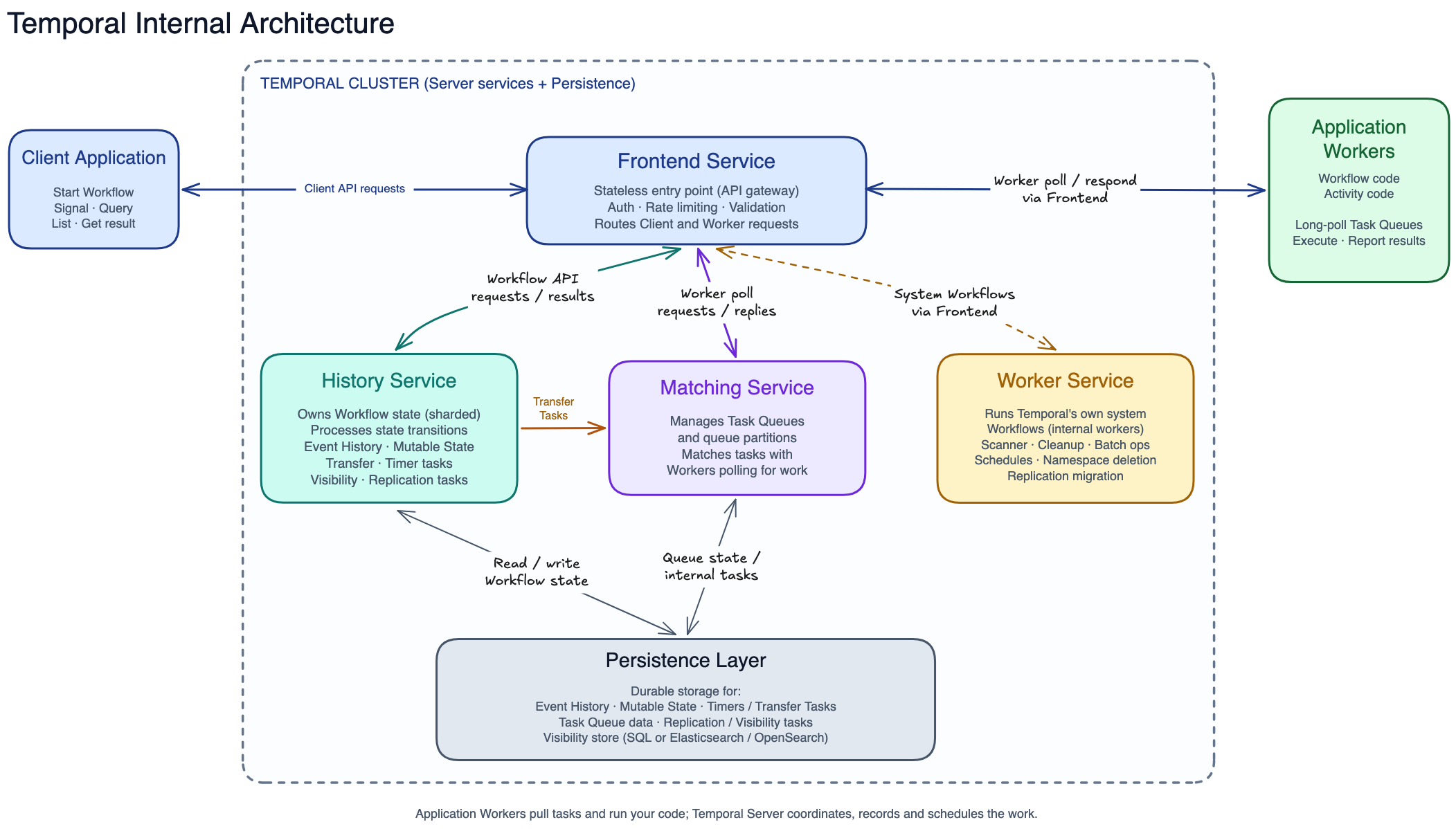
A Temporal deployment has a few important components:
- Temporal Client
- Frontend Service
- History Service
- Matching Service
- Worker Service
- Persistence Layer
- Application Workers
Let’s understand their responsibilities.
6.1 Temporal Client
The Temporal Client is what our application uses to communicate with the Temporal Server.
It provides APIs to:
- Start a Workflow Execution.
- Send a Signal to a Workflow Execution.
- Query a Workflow Execution.
- List Workflow Executions.
- Get the result of a Workflow Execution.
For example, when a customer places an order, our application can start an Order Workflow using the Temporal Client.
The client does not execute the Workflow itself. It communicates with the Temporal Server.
6.2 Frontend Service
The Frontend Service is the entry point into the Temporal cluster.
Both Clients and application Workers connect to the Temporal Server through the Frontend.
When a client starts a Workflow or sends a Signal, the request first reaches the Frontend Service.
The Frontend then routes the request to the appropriate backend service.
The Frontend is designed to be stateless, which makes it possible to scale multiple Frontend instances independently.
6.3 History Service
The History Service is responsible for maintaining the durable state of Workflow Executions.
Whenever something important happens during a Workflow, Temporal records it in an ordered Event History.
For example:
WorkflowStarted
ActivityScheduled
ActivityStarted
ActivityCompleted
TimerStarted
TimerFired
SignalReceived
WorkflowCompleted
The actual event sequence depends on what happens during execution.
This history allows Temporal to reconstruct the Workflow after a failure.
The History Service also processes Workflow state transitions and manages internal tasks such as timers, transfers, replication and visibility indexing.
We will look at how it stores and processes Workflow state in the next section.
6.4 Matching Service
The Matching Service manages Task Queues and coordinates the delivery of tasks to application Workers.
When a Workflow or Activity needs to execute, the History Service generates the necessary work.
The Matching Service makes that task available to a Worker polling the appropriate Task Queue.
It also handles Worker polling and Task Queue partitions.
6.5 Worker Service
There is a small distinction worth understanding here.
The Worker Service handles Temporal’s own internal background functionality.
It takes care of internal/system Workflows and operational tasks such as:
- Maintenance jobs.
- Cleanup.
- Replication.
- Archival.
- Visibility indexing.
For example, archiving old Event Histories and running scheduled maintenance are part of the operational work handled by Temporal’s internal Worker Service.
This is different from our application Workers, which execute our own Workflow and Activity code.
6.6 Application Workers
Temporal Server does not execute our application Workflow and Activity code inside the Temporal Service.
Instead, we run separate Worker processes.
These Workers:
- Poll Temporal for tasks.
- Execute Workflow or Activity code.
- Return the results to Temporal.
This separation is useful because we can scale application Workers independently of the Temporal Server.
6.7 Persistence Layer
Temporal needs durable storage for Workflow state, Event History and internal tasks.
This is handled by the Persistence Layer.
The persistence backend is configurable. The database choices in the notes include Cassandra, MySQL, PostgreSQL and SQLite, depending on the deployment and configuration.
The important point is that Workflow progress does not exist only in worker memory. It is backed by durable storage.
7. How Temporal distributes Workflow state: History Shards
A Temporal cluster may be responsible for millions of Workflow Executions.
The History Service cannot have a single machine responsible for processing every Workflow.
So how does Temporal distribute this work?
It uses History Shards.
Workflow Executions are divided across a fixed number of History Shards.
Each History Service instance owns a subset of these Shards and is responsible for processing requests and timers for the Workflows inside them.
For example:
History Service A
    Shard 1
    Shard 2
    Shard 3
History Service B
Shard 4
Shard 5
Shard 6The actual allocation depends on the cluster’s shard configuration and ownership.
If History Service instances are added, removed or fail, ownership of their Shards can move between instances.
This allows Temporal to distribute Workflow processing across multiple History Service instances.
Event History vs Mutable State
Event History tells us everything that has happened in a Workflow.
For example:
WorkflowStarted
PaymentActivityCompleted
InventoryActivityCompleted
ShipmentActivityScheduled
But the History Service also needs an efficient way to know what is happening right now.
For example:
- Which Activities are pending?
- Which timers are outstanding?
- Are there child Workflows?
- What work needs to happen next?
Reconstructing all this information from the entire Event History every time would be expensive.
Temporal maintains something called Mutable State.
Think of Mutable State as a materialised view of the current server-side Workflow state.
It contains information such as pending Activities, outstanding timers and child Workflows.
The distinction is:
- Event History is the durable record of what happened.
- Mutable State is an efficient representation of the current execution state.
Both are important for managing Workflow progress.
8. Why does Temporal need Transfer Tasks?
The History Service needs to make sure that updating Workflow state and scheduling whatever happens next do not get separated by a crash.
Let’s consider a situation where an Activity completes successfully.
The History Service needs to do two things:
- Record the Activity completion and update the Workflow state.
- Schedule the next work so that a Worker can execute it.
Now imagine the History Service updates the database successfully but crashes before sending the next task to the Matching Service.
The database knows that the Activity completed.
But the Matching Service never received the next task.
The Workflow might get stuck because nobody knows that there is work to be executed.
How does Temporal avoid this?
It uses an internal mechanism called Transfer Tasks.
How Transfer Tasks work
When the History Service processes an Activity completion, it persists three important things together:
- Event History update.
- Mutable State update.
- A Transfer Task.
A Transfer Task is an internal task created by Temporal’s History Service to tell it to deliver work to the Matching Service.
Conceptually, the flow looks like this:
Activity completes
       |
       v
History Service
       |
       | 1. Record Event
       | 2. Update Mutable State
       | 3. Create Transfer Task
       |
       v
Persistence Database
       |
       | Commit state + task together
       |
       v
Background Processor
       |
       | Read Transfer Task
       |
       v
Matching Service
       |
       | Make Workflow Task available
       |
       v
Worker polls and executes
The important detail is that Workflow state and the Transfer Task are committed together.
A background processor eventually reads the pending Transfer Task and sends it to the Matching Service.
What happens if History Service crashes?
Let’s say the History Service successfully commits the database update but crashes before dispatching the task.
The database still contains the pending Transfer Task.
After the service recovers, a background processor can read that task and dispatch it to the Matching Service.
The corresponding Workflow Task can then become available to a Worker.
This prevents the system from losing the scheduling operation simply because a service crashed between updating the database and communicating with another service.
Timers also use durable internal tasks. A Timer Task is stored with its deadline, and background processing handles it when it becomes due.
9. How Temporal avoids replaying everything constantly
Replay gives Temporal a powerful recovery mechanism.
But imagine a Workflow that has been running for six months and has thousands of events in its Event History.
Replaying the entire history from the beginning every time anything happens would be expensive.
Temporal uses an optimisation called Sticky Execution.
Understanding Workflow Cache and Sticky Queue
When a Worker receives a Workflow Task for the first time, it reconstructs the Workflow using its Event History.
The reconstructed Workflow state is then maintained in the Worker’s Workflow Cache.
When the same Workflow needs to run again, Temporal tries to route its next Workflow Task to the same Worker.
Since the Worker already has the reconstructed state in memory, it can avoid unnecessary replay from the beginning.
This routing optimisation is called Sticky Execution.
Under the hood, a Worker polls two types of queues:
- The normal Task Queue.
- A Worker-specific Sticky Queue.
Once a Worker has cached a Workflow, future Workflow Tasks can be routed through that Sticky Queue.
Consider this example:
            Temporal
                |
          Sticky Queue
                |
                v
             Worker A
                |
                v
          Workflow Cache
Worker A has already reconstructed the Workflow and has its state in memory.
The next Workflow Task can be routed back to Worker A rather than forcing another Worker to reconstruct the Workflow again.
What happens if Worker A crashes?
Sticky Execution is an optimisation, not a requirement for correctness.
Suppose Worker A has a Workflow in its cache and suddenly crashes.
Temporal cannot use that in-memory cache anymore.
So it falls back to the normal Task Queue.
Another Worker, Worker B, receives the task and reconstructs the Workflow by replaying the Event History.
Worker B does not have the cached state, so it rebuilds the execution from the durable Event History.
The Workflow can then continue from the previously recorded progress.
This gives us faster execution during normal operation without making correctness dependent on a particular Worker remaining alive.
10. How Task Queues connect Temporal to Workers
Now let’s understand how Temporal decides which Worker should execute a particular Activity.
The answer is Task Queues.
When building an application, we can define different Task Queue names.
For example:
orders-workflow
payments
shipping
email
We then configure Workers to poll the appropriate queues.
When the History Service needs a Workflow Task or Activity Task to be executed, it creates the necessary work.
The Matching Service looks for a Worker polling the corresponding Task Queue and makes the task available to it.
There are two important types of tasks.
Workflow Task
A Workflow Task tells a Worker to execute Workflow code and determine what should happen next.
For example, after the payment Activity completes, the Workflow may need to schedule the inventory reservation Activity.
Activity Task
An Activity Task tells a Worker to perform an external operation, such as calling Stripe, updating inventory or sending an email.
These tasks do not necessarily need to run on the same machines.
For example, payment Activities can run on a dedicated Worker fleet, while shipping Activities run on another fleet.
What if no Worker is available?
When a Worker is already polling, Matching can hand the task to it directly.
Otherwise, the task can be stored in the persistence database until a Worker becomes available.
Task Queues can also be partitioned across Matching Service instances to increase throughput.
This means a heavily used Task Queue does not need to depend on a single machine.
11. How does the Temporal cluster scale?
Now we can put the architecture together.
One important design decision in Temporal is that the different services can scale independently.
The major components have different scaling responsibilities.
Frontend Fleet
Handles incoming client and Worker requests. Since the Frontend is stateless, we can add more instances independently.
History Fleet
Owns and processes History Shards. Adding or removing History Service instances changes shard ownership across the fleet.
Matching Fleet
Manages Task Queue partitions and coordinates work delivery to Workers. Task Queue partitions allow Matching to distribute queue processing across multiple instances.
Application Workers
Execute our actual Workflow and Activity code.
We can increase the number of Workers based on how much application work needs to be processed.
For example, suppose payment processing suddenly gets a lot of traffic.
We can increase the number of payment Activity Workers without necessarily increasing the number of shipping Workers.
Similarly, we can scale Temporal’s internal services based on their own workloads.
This separation is useful when building systems that handle a large number of Workflow Executions.
12. When should you use Temporal?
Temporal provides quite a lot of functionality, but that does not mean every background job should use it.
The main question is: does your process need durable orchestration?
Temporal is a good fit when you have a multi-step process that needs to survive failures, retries and long waiting periods.
A common sign that you might need Temporal is when you have started building a state machine yourself.
For example, you might already have:
- Database columns tracking which steps have completed.
- Retry counters.
- Scheduled jobs to resume unfinished work.
- Logic to prevent already-completed steps from executing again.
- Recovery logic when workers crash.
- Webhooks to resume waiting processes.
At some point, you are effectively building your own workflow engine.
When Temporal makes sense
1. A process has several dependent steps
Consider a YouTube video post-processing pipeline.
A video needs to be split into segments, multiple segments need to be transcoded in parallel, and the results need to be joined into the final output.
If one processing Worker disappears halfway through the pipeline, Temporal can reconstruct the Workflow and continue scheduling unfinished work.
2. The process needs to stay open while waiting for something
Consider an Uber-style ride-matching system.
The Workflow needs to find a driver, wait for the driver’s response, handle timeouts and potentially move to the next candidate.
This is not simply a single background job. It is a long-running process that reacts to external events.
3. You need to recover from partial execution
If a video-processing Worker disappears halfway through the processing DAG, Temporal can reconstruct the Workflow and continue scheduling unfinished work.
4. Retries and recovery are becoming a meaningful part of your application logic
If you are already maintaining execution state, retry counters, scheduled jobs and recovery mechanisms, it might be time to consider a workflow orchestration system.
When should you avoid Temporal?
Temporal is not a replacement for every messaging or background processing system.
There are cases where simpler tools are a better choice.
Simple background jobs: Use SQS
If you only need to queue a job and process it independently, a simple message queue such as Amazon SQS might be sufficient.
For a single independent background task, you may not need the additional orchestration capabilities of Temporal.
Streaming workloads: Use Kafka
If your primary requirement is handling continuous streams of events, Kafka is designed for that kind of workload.
Temporal is focused on durable Workflow execution, not stream processing.
External side effects still need idempotency
Temporal can retry Activities, but external systems still need to handle duplicate requests safely.
Workflow code has constraints
Because Temporal reconstructs Workflows through deterministic replay, you cannot treat Workflow code exactly like ordinary application code.
Operations involving changing external state, such as database queries or external API calls, generally belong inside Activities.
These constraints need to be understood before adopting Temporal.
Conclusion
The interesting thing about Temporal is that it changes how we think about long-running application processes.
Instead of building a system where a Worker must remain alive until a process is completed, we build a Workflow whose progress is recorded durably.
A new Worker can reconstruct that execution using Replay, while Activities handle external operations and Event History records what happened. Timers and Signals allow Workflows to wait for deadlines or external events without keeping a Worker occupied.
Behind the scenes, History Shards distribute Workflow ownership, Mutable State maintains the current execution state, and Transfer Tasks ensure that scheduling work is not lost when a service crashes. Sticky Execution avoids unnecessary replay during normal operation, while Task Queues connect the Temporal Server to application Workers.
The important distinction is that recovering a Workflow and reversing a business operation are two different things. Temporal can recover execution, but compensating operations such as refunding a payment or releasing inventory still need to be implemented by the application.
The real value of Temporal is not just that it can execute background jobs. It is that it can manage an entire business process, remember where it stopped, and continue from there even when the infrastructure running it does not survive.
If you found this article helpful, do leave a clap 👏 and follow for more insights on GenAI, Python, and backend engineering!
Discussion
Have a question, a correction, or a different approach? Sign in with GitHub to join the conversation.